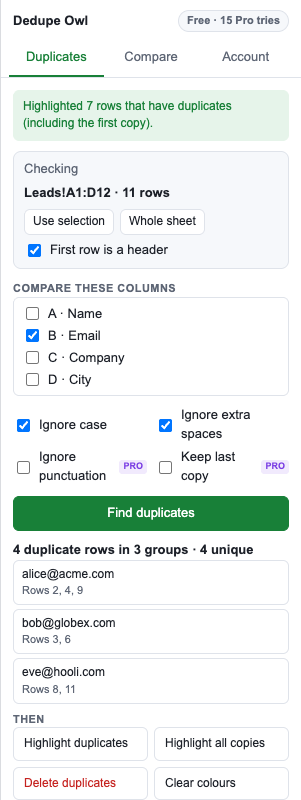
Pick the columns that matter, see every duplicate group before you touch anything, then highlight, delete or move them. Ignores case and stray spaces, so “Alice@Acme.com ” and “alice@acme.com” match.
Works only inside the spreadsheet you open it in. Never stores your data.
See what will change first, choose what counts as a duplicate, and decide what happens to the copies.
See each set of duplicates with its row numbers before anything changes.
Compare one or several columns. Ignore case and extra spaces, or punctuation too. (punctuation: Pro)
Colour the extra copies or every copy, or delete them. Your own cell colours are left alone.
Label every row as Unique, Duplicate or Duplicate (kept) so you can filter and sort. Pro
Move duplicates to their own sheet instead of deleting them, and keep the first or the last copy. Pro
Find rows that are in this sheet but not in another, or in both, e.g. new leads vs. existing customers. Pro
Finding, highlighting and deleting duplicates is free for sheets up to 500 rows. Every Pro feature can be tried 15 times for free.
Payments are handled by Polar, our merchant of record, which takes care of sales tax and VAT. Your license key arrives by email straight away.
Only the spreadsheet you open it in (the “current spreadsheet only” permission), plus showing its sidebar and contacting our license server. It can't see your other files.
The first copy of each value is kept (or the last, with Pro) and the extra copies are removed. Only cells inside the checked range move up, so data beside it is untouched. You can undo with Ctrl+Z / ⌘Z or File → Version history.
No. “Clear colours” only removes the colours Dedupe Owl added.
After purchase you'll get a license key by email. Open Dedupe Owl, go to Account, paste the key and click Activate.
If Pro doesn't work for you, email us within 14 days of purchase for a full refund.